In this article
- The 10 best AI video creation companies right now
- 1. Google, Veo 3.1
- 2. Runway
- 3. Kling 3.0
- 4. ByteDance, Seedance
- 5. Higgsfield
- 6. HeyGen
- 7. Synthesia
- 8. Artlist
- 9. OpenArt
- 10. Adobe Firefly
- Also worth knowing
- How can I make a video with AI?
- Which AI makes real videos?
- Can AI produce video?
- Is there a 100% free AI video maker?
- Which AI tool is the best for video production?
- How much does it cost to produce AI video?
- Ignore the AI influencers
- Where this actually leaves you
- Google Veo 3.1, Kling 3.0 and ByteDance’s Seedance lead on raw output quality. HeyGen and Synthesia own presenter video. Artlist and Adobe Firefly are the ones you use when somebody will ask whether you are cleared to run it.
- Sora is gone. OpenAI shut the consumer app in April 2026 and the API stops accepting requests on 24 September 2026, with no announced successor.
- Nothing here is 100% free without a watermark. Every legitimate free tier is a capped credit allowance, and the real cost is the retries, not the subscription.
Most “best AI video tool” lists are written by people who never delivered a client video with any of them. This one is written from the other side: what happens when you have a deadline, a brand guideline, and someone paying you.
Everything below is accurate as of July 2026. This industry moves faster than any other category in software right now. Kling 3.0 shipped in February. Seedance 2.0 shipped in February and got 4K in June. Runway swapped its Unlimited plan for a credit-based Max plan in May. Google’s legacy Veo 3.0 API endpoints shut down on 30 June. By the time you read this, at least one price on this page has probably changed, so check the vendor’s own pricing page before you commit a budget.
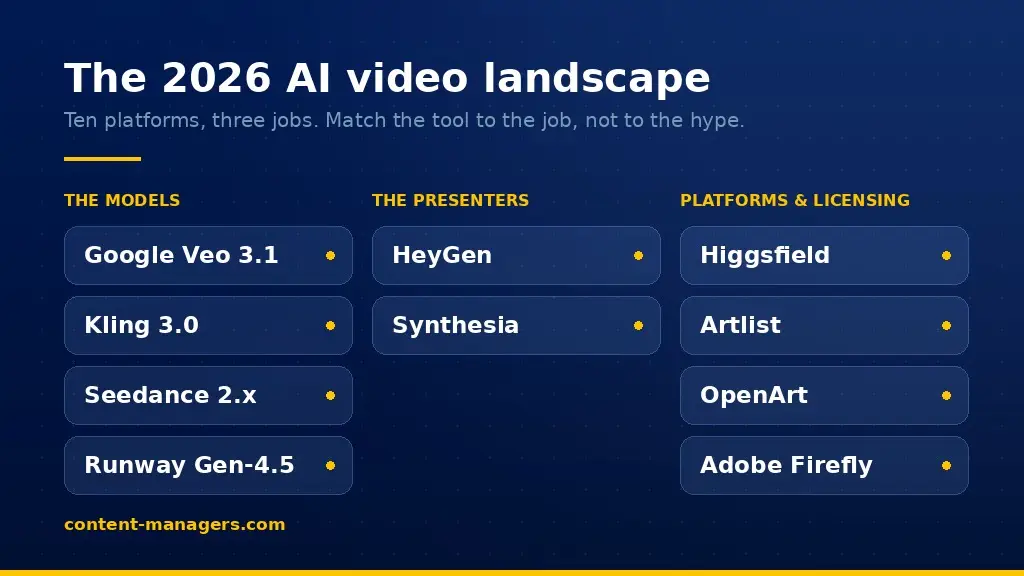
Here are the ten worth your attention right now, what each one is actually good at, and where each one will waste your time.
The 10 best AI video creation companies right now
1. Google, Veo 3.1
The strongest general-purpose model on the market. Native synchronized audio in a single pass, meaning dialogue, ambient sound and effects come out with the video instead of being bolted on after. Physics and scene comprehension are the best available, which matters the moment your prompt has more than one thing happening in it.
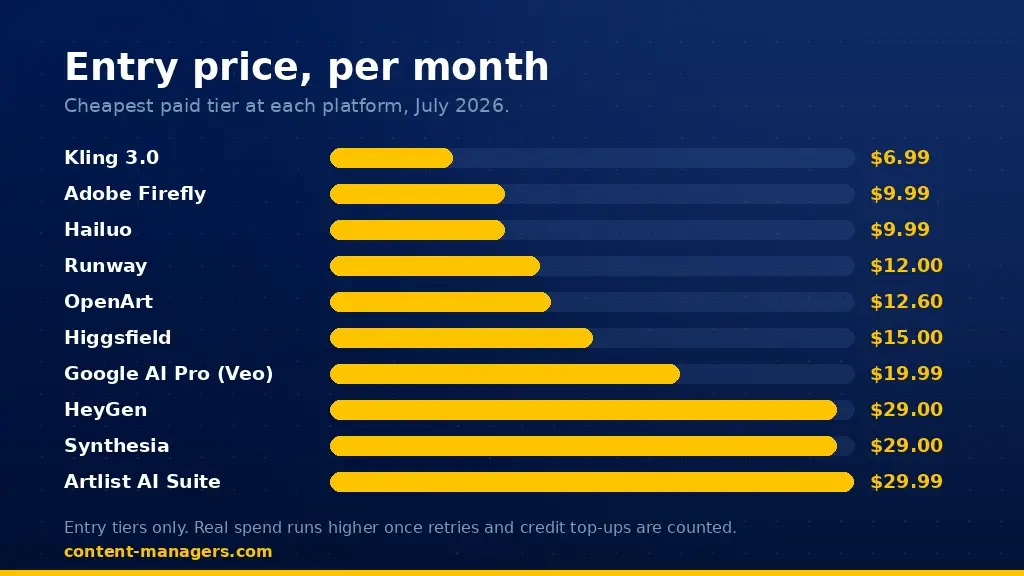
You get it three ways. Flow, Google’s filmmaking tool, gives non-subscribers around 50 free credits a day. Google AI Pro at about $19.99 a month gives you real working volume. Ultra sits at $249.99 a month for people producing constantly. On the API, pricing starts around $0.05 per second for Veo 3.1 Lite and climbs from there, so an 8 second clip lands anywhere between pocket change and a few dollars depending on which tier you call.
Use it for: the hero shot. The one clip in the campaign that has to look expensive.
2. Runway
Gen-4.5 plus the best director controls in the category. Camera moves, generative editing, motion brush, and an actual timeline. Runway is what you use when the shot in your head has a specific move and you are not willing to reroll fifty times hoping the model guesses it.
The free tier gives 125 one-time credits, which is a demo, not a workflow. Standard is $12 per user per month on annual, Pro $28, Max $76. Gen-4.5 video burns 25 credits per second, so do that math before you pick a tier. The old Unlimited plan closed to new subscribers in May 2026 and existing users move to Max in September.
Use it for: controlled cinematography and cleanup work on shots you already have.
3. Kling 3.0
Kuaishou’s model, out since February 2026, and the best value per generation in the top tier. Motion handling is excellent, especially anything with bodies, crowds, or fast action, which is exactly where most models fall apart.
Entry plans start around $6.99 a month, serious use sits around $25.99, and there is a $128 Ultra tier with roughly triple the credits. API access runs about $0.084 to $0.168 per second. For high-motion content at volume, nothing else in the top tier comes close on cost.
Use it for: sports, action, dance, anything where a body has to move and stay believable.
4. ByteDance, Seedance
Seedance 2.0 landed in February 2026 and 2.5 followed. It generates video and audio together in a single pass, takes text, image, audio and video as input, runs 4 to 15 second clips, and picked up 4K output in June. Because ByteDance owns the pipeline, it is wired straight into CapCut and Dreamina, which is where a lot of short-form actually gets finished.
Use it for: short-form social where you want the model and the editor in the same place.
5. Higgsfield
Higgsfield is not one model, it is a front end over fifteen or more of them, including Veo 3.1 and Kling 3.0, with 70+ camera presets on top: bullet time, crash zoom, 360 rotation, dolly. Soul ID keeps a character consistent across shots, which is the single hardest thing to do in AI video and the reason people pay for this specifically.
Starter is $15 a month on annual billing for 200 credits, Plus $39 for 1,000, Ultra $99 for 3,000. Read that credit line carefully: premium models cost 40 to 70 credits per generation, so 200 credits is under five good clips. Top-up packs run about $5 per 100 credits and expire after 90 days. Higgsfield is genuinely good and genuinely easy to overspend on.
Use it for: cinematic short clips with repeatable characters and camera language.
6. HeyGen
The best avatar and talking-head platform for business video. Clone yourself once, then produce a presenter video from a script in minutes, in dozens of languages, with lip sync that holds up. Video translation with lip sync is the feature that sells it: one recording becomes twelve markets.
Free gives 3 watermarked videos a month. Creator is $29 a month, or $24 on annual, with 200 credits. Pro is $99, Business is $149 plus $20 per seat with 4K and custom avatars. The credit math is where people get caught: Avatar IV eats 20 credits per minute, so Creator’s 200 credits is about ten minutes of premium avatar video, and credits do not roll over.
Use it for: sales videos, onboarding, product explainers, and multilingual versions of anything you already recorded.
7. Synthesia
HeyGen’s enterprise-shaped competitor. Fewer flashy features, more of what a compliance department asks about: SSO, SCORM export for learning systems, unlimited personal avatars at the enterprise tier, 240+ stock avatars. If your video is training content that has to live inside an LMS, this is the one.
Free is 10 watermarked minutes a month. Starter is $29 a month, reportedly around $18 on annual after a recent price drop. Creator is $89 for 30 minutes a month plus API access. Enterprise is custom and unlimited.
Use it for: internal training, compliance, and anything that needs to exist in 40 languages next quarter.
8. Artlist
The most underrated name on this list for anyone doing commercial work. Artlist put 38 generative video models behind one subscription, including Veo 3.1, Kling 3.0, Seedance 2.0, Sora 2 and Wan, then wrapped the whole thing in a single commercial license with legal indemnification. On top of that sits their original business: stock footage, music, sound effects and voiceover.
The AI Suite plan starts around $29.99 a month, Artlist Max is $39.99. The hybrid workflow is the clever part, where you seed a generation with real 8K stock footage so the output inherits actual lens quality and lighting instead of the plastic AI look.
Use it for: client and brand work where somebody will eventually ask “are we cleared to run this?”
9. OpenArt
The best story tool in the group. One-Click Story and Director mode turn a script into a multi-scene sequence with consistent characters, which is a different job from generating one great clip. If you are making something with a beginning, middle and end, this saves more hours than a better model would.
Essential is about $12.60 a month on annual and covers roughly 50 videos and 5 one-click stories. Advanced is about $27.20 with 12,000 credits. Credit costs are fixed per action, so you know the price before you hit generate, which is rarer than it should be.
Use it for: narrative shorts, explainers, and storyboarding a full sequence fast.
10. Adobe Firefly
Boring, and that is the point. Firefly’s video model was trained on licensed Adobe Stock, openly licensed and public domain material, every output carries Content Credentials, and enterprise users get Adobe’s indemnity. It also sits inside Premiere and After Effects, so it drops into a real post workflow instead of living in a browser tab.
A free tier exists. Standard is $9.99 a month, Pro $19.99, Pro Plus $49.99, Premium $199.99. Adobe removed generative credit caps for video and image on the top plans in 2026, which changed the math considerably for heavy users.
Use it for: regulated industries, big brands, and any project where provenance is part of the deliverable.
Also worth knowing
Hailuo from MiniMax deserves a mention for anyone starting out. Free tier with daily refreshing credits, Standard from $9.99, and quality that punches well above the price. And a warning on Sora: OpenAI shut down the consumer app in April 2026 and the API stops accepting requests on 24 September 2026, with no announced successor. If anything you built depends on it, migrate now.
How can I make a video with AI?
The honest version of this process has four steps, and only one of them involves the model.
Start with the sentence. Not the prompt, the sentence: what this video has to make someone do. Then write the shot list, because AI video generates in 4 to 15 second clips, so a 45 second video is six to ten separate generations that need to cut together. Not done, as then it generate, expecting to throw most of it away. Then assemble in a real editor, add captions, and export at platform spec.
The mistake almost everyone makes is treating the model as the whole workflow. It is one step. The finished video still needs a script, an edit, sound, captions and correct aspect ratios, and that is the part that separates a video people watch from a clip people scroll past. That gap is exactly why AI Video Production as a service still exists in a world where anyone can type a prompt.
Which AI makes real videos?
If “real” means photorealistic and physically believable, three names: Google Veo 3.1, Kling 3.0 and Seedance 2.x. Veo leads on scene comprehension and native audio, Kling leads on motion and bodies, Seedance leads on integrated audio-video generation and now 4K.
If “real” means a real human presenter, that is a different technology entirely. HeyGen and Synthesia clone an actual person and drive them with a script. Nobody confuses one for the other in practice, but plenty of people shop for one while describing the other.
Where all of them still break: hands doing fine work, readable text inside the frame, and any single shot longer than about fifteen seconds. Lip sync accuracy and hand naturalness improved sharply through 2026, but “improved” is not “solved”.
Can AI produce video?
Yes, and it already runs as paid media at scale. What it cannot do yet is produce a finished, on-brand, correctly formatted video from a single instruction with nobody checking the output.
Expect a ratio. For one usable 8 second shot that matches a specific brief, budget 5 to 15 generations. For a 30 second branded piece, expect 10 to 30 generations plus an edit. Anyone quoting you a 1:1 hit rate is showing you their best result out of a hundred, not their average.
Is there a 100% free AI video maker?
Free, yes. 100% free with no watermark and no limit, no.
Video generation costs real compute, so every legitimate free tier is a limited credit allowance rather than open access. The best of them as of July 2026: Google Flow gives non-subscribers around 50 credits a day, Hailuo gives daily refreshing credits with just an email signup, Adobe Firefly has a free tier, HeyGen gives 3 watermarked videos a month, and Synthesia gives 10 watermarked minutes.
The only genuinely unlimited route is running an open-source model locally. Alibaba’s Wan ships under Apache 2.0 and runs on a consumer NVIDIA GPU with no credits, no queue and no watermark. The software is free, the GPU is not, and the setup will cost you a weekend. If you have the hardware, it is the best deal in the category. If you do not, it is not a real option.
Which AI tool is the best for video production?
There is no single answer, and any list that gives you one is selling something. Match the tool to the job.
| What you need | Use |
|---|---|
| Best overall quality, one hero shot | Google Veo 3.1 |
| Precise camera control and editing | Runway Gen-4.5 |
| High motion, best cost per clip | Kling 3.0 |
| Short-form social, model plus editor | Seedance via CapCut |
| Consistent characters, cinematic presets | Higgsfield |
| Presenter and multilingual video | HeyGen |
| Enterprise training and compliance | Synthesia |
| Licensed commercial work | Artlist or Adobe Firefly |
| Multi-scene stories | OpenArt |
| Starting out on a budget | Hailuo |
If you want one stack instead of one tool: Veo or Kling for generation, Higgsfield or Artlist for the aggregator layer and licensing, HeyGen for anything with a presenter, and a real editor to finish. That combination covers about 90% of commercial video briefs.
How much does it cost to produce AI video?
Three honest tiers, based on what people actually spend rather than what the pricing page implies.
Testing and hobby, $0 to $20 a month. Free tiers plus one entry subscription. Enough to learn, not enough to deliver on a deadline.
Solo professional, $50 to $150 a month. Usually two or three subscriptions, because no single platform covers generation, presenters and licensing. This is where most freelancers and small marketing teams land.
Business and agency, $300 to $800 a month. Multiple seats, higher credit tiers, licensed assets, and API access for anything automated. Still an order of magnitude below a studio, which is the whole reason this category exists.
Then there is the cost nobody puts on a pricing page. The retries. Credits are consumed on every generation including the failures, and the failures outnumber the keepers by roughly five to one. When you budget, multiply the sticker price by three and you will be close. And count the hours: a person still has to write, curate, edit and format, and at any realistic hourly rate that time costs more than the subscriptions do.
Ignore the AI influencers
While We’re listing the best AI video tools, this part might matters more.
Your feed is full of people posting a jaw-dropping ten second clip with the caption “this changes everything” and a link in bio. Three things are true about almost every one of those posts.
They are affiliates. AI tool affiliate programs pay 30% to 50% recurring commission, which means the person telling you to switch platforms this week gets paid every month you stay subscribed. That is not a conspiracy, it is a business model, and it is rarely disclosed.
The clip is the best of many. Nobody posts generation 47 out of 60. You are seeing the top 2% of output presented as the typical result, and then you subscribe, generate five clips, and quietly assume you are the problem. You are not, that is just the hit rate.
Their prompt is not your brief. A moody cyberpunk street at night is easy. Your client’s product, in your client’s colors, with legible text and a specific logo placement, is hard. Demo prompts are chosen precisely because they avoid every constraint that real work has.
The damage is not the subscription fee, but the churn. Chasing every launch means you are permanently a beginner on six platforms instead of competent on one. Skill compounds, and switching resets it.
A rule that works: pick one tool, use it for 30 days, and ship one real deliverable with it. Only then look at what else is out there. New models will keep arriving weekly and most of them will not change your output at all.
Where this actually leaves you
The tools are good enough. As of July 2026 you can produce commercial-grade video without a crew, a studio or a three week timeline, and the quality question is basically settled for most business use cases.
The bottleneck moved. It is now taste, brief writing, editing and consistency, and none of those are things you can subscribe to. The businesses winning with AI video are not the ones with the best tool, they are the ones who decided what the video has to do before they opened one.
If you would rather skip the tool churn and just have the video, that is what we do. Priced per asset, agreed before we start, first draft in days.
Google, Veo 3.1 updates in Flow
OpenAI Help Center, what to know about the Sora discontinuation
eesel AI, Runway AI pricing 2026
eesel AI, Kling AI pricing 2026
eesel AI, HeyGen pricing 2026
OpenArt, pricing
Artlist, AI video generator
Adobe, Firefly
fal, Seedance 2.0 API
Synthesia, best AI video generators 2026